Quick Answer: What Is Project Management Software?
Project management software is a digital platform that helps businesses and teams organize projects, assign tasks, monitor deadlines, collaborate more effectively, and track progress from start to finish. Instead of relying on spreadsheets, emails, or manual updates, project management software centralizes work in one place, improving productivity, communication, and project visibility.
In This Guide, You’ll Learn
Core Concepts: Understand what project management software is, how it works, and how it compares to traditional spreadsheets.
Benefits & Features: Explore major team advantages and essential platform features like cloud versus desktop deployment options.
Selection & Strategy: Learn how to choose the right software for your goals, avoid common pitfalls, and follow best practices for successful implementation.
Introduction:
Managing projects becomes increasingly difficult as a business grows. Team members work on multiple tasks simultaneously, deadlines overlap, files become scattered across different platforms, and important updates often get buried in long email conversations. Even small communication gaps can lead to missed deadlines, duplicated work, frustrated employees, and unhappy clients.
Many businesses initially rely on spreadsheets, notebooks, or messaging apps to manage projects. While these methods may work for small teams, they quickly become difficult to maintain as projects become more complex. Without a centralized system, managers struggle to monitor progress, employees lose track of priorities, and collaboration becomes less efficient. This is where project management software makes a significant difference.
Project management software provides one central workspace where teams can plan projects, assign responsibilities, set deadlines, share files, communicate, and monitor progress in real time. Everyone involved can see what needs to be completed, who’s responsible for each task, and how the project is progressing.
Modern project management tools go far beyond simple task lists. Many include calendars, Kanban boards, Gantt charts, time tracking, reporting dashboards, workflow automation, mobile applications, and integrations with CRM systems, communication platforms, and cloud storage services. These features help businesses reduce manual work while improving visibility across every stage of a project.
Project management software is no longer limited to large enterprises. Small businesses, startups, freelancers, marketing agencies, software development teams, consultants, and even nonprofit organizations now rely on these platforms to stay organized and improve collaboration.
However, choosing the right solution isn’t always straightforward. Some platforms focus on simplicity, while others provide advanced resource planning, budgeting, automation, and reporting capabilities. Selecting software without understanding your team’s actual requirements often results in paying for features that remain unused.
This guide explains what project management software is, how it works, the benefits it offers, and how to choose the right platform based on your business needs. Whether you’re managing a small team or overseeing multiple projects across different departments, you’ll learn practical strategies that help improve productivity and deliver projects more successfully.
What Is Project Management Software?
Project management software is a business application designed to help teams plan, organize, execute, and monitor projects more efficiently.
Instead of storing project information across spreadsheets, emails, chat applications, and paper documents, everything is organized inside one centralized workspace. Team members can easily access project timelines, task assignments, deadlines, documents, conversations, and progress updates without switching between multiple tools.
Think of project management software as the central command center for every project your business manages.
For example, imagine a marketing agency launching a new website for a client. The project manager creates a project, assigns tasks to designers, content writers, SEO specialists, and developers, sets deadlines for each milestone, uploads project files, and monitors progress through a shared dashboard. Every team member knows what needs to be done, while the client receives updates without endless email chains or status meetings.
The same principle applies across many industries. Construction companies track project phases, software teams manage product development, consulting firms organize client work, and small businesses coordinate daily operations all from one platform.
Rather than replacing teamwork, project management software improves it by making responsibilities, timelines, and communication much clearer.
Businesses That Commonly Use Project Management Software
Project management software is used across a wide variety of industries because almost every organization manages projects in some form. Some common examples include:
- Small businesses coordinating daily operations
- Startups managing product launches
- Marketing agencies handling client campaigns
- Software development teams tracking sprints
- Construction companies monitoring project timelines
- Consulting firms managing client deliverables
- Event management companies organizing events
- Educational institutions planning academic projects
- Creative agencies coordinating design work
- Remote teams collaborating across different locations
Regardless of the industry, the goal remains the same: keeping projects organized while improving communication and accountability.
How Project Management Software Works
Although every platform has its own interface, the overall workflow remains similar across most project management systems.
Step 1: Create a Project
Everything begins by creating a new project. Managers define the project name, objectives, deadlines, team members, and overall timeline. This creates a structured workspace where every project activity will be managed.
Step 2: Break the Project into Tasks
Large projects become easier to manage when they’re divided into smaller tasks.
Each task typically includes:
- Task title
- Description
- Assigned employee
- Priority level
- Due date
- Attachments
- Comments
- Progress status
This makes responsibilities clear from the beginning.
Step 3: Assign Team Members
Managers assign each task to the appropriate team member. Everyone immediately knows:
- What they’re responsible for
- When work is due
- Which tasks depend on other team members
- Current project priorities
This improves accountability while reducing confusion.
Step 4: Collaborate in One Place
Instead of communicating across multiple platforms, employees can collaborate directly inside the project. Most platforms allow teams to:
- Comment on tasks
- Share files
- Tag colleagues
- Update progress
- Receive notifications
- Track revisions
Keeping communication connected to each task makes projects easier to manage.
Step 5: Track Progress
Managers monitor project performance using dashboards that display:
- Completed tasks
- Pending work
- Upcoming deadlines
- Team workload
- Overall project progress
This real-time visibility helps identify delays before they become major problems.
Expert Tip: Project management software delivers the greatest value when every team member uses it consistently. Updating tasks regularly, communicating within the platform, and reviewing project dashboards each day keeps information accurate and helps projects stay on schedule.
Key Features of Project Management Software
Modern project management software offers much more than simple task lists. The best platforms combine planning, collaboration, reporting, and automation to help teams work more efficiently while keeping projects on schedule. Although every platform has its own capabilities, the following features are considered essential for most businesses.
Task Management: Task management is the foundation of every project management system. Managers can create individual tasks, assign them to team members, set deadlines, define priorities, and monitor progress from one centralized dashboard.
A well-organized task management system helps teams clearly understand:
- What needs to be completed
- Who is responsible
- When work is due
- Current project priorities
Instead of relying on emails or verbal instructions, every task remains documented and visible throughout the project lifecycle.
Project Planning: Every successful project starts with a clear plan. Project management software allows businesses to organize projects into milestones, phases, and timelines before work begins. Managers can:
- Create project roadmaps
- Define project goals
- Set milestones
- Allocate resources
- Estimate completion dates
Planning ahead helps reduce delays while ensuring everyone understands project expectations from the beginning.
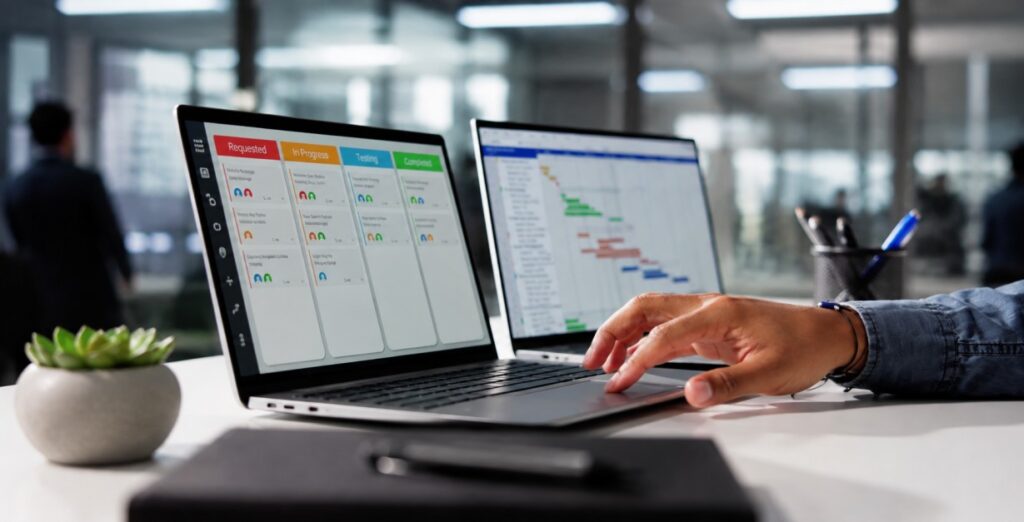
Kanban Board: Kanban boards provide a visual way to organize work. Tasks typically move through stages such as:
To Do
↓
In Progress
↓
Review
↓
Completed
This simple workflow allows team members to quickly understand project status without reading lengthy reports. Kanban boards are especially popular among marketing teams, software developers, creative agencies, and startups because they simplify daily task management.
Gantt Charts: For larger or more complex projects, Gantt charts provide a timeline-based view of every activity. Managers can see:
- Project duration
- Task dependencies
- Resource allocation
- Milestone deadlines
- Overall project progress
Gantt charts make it easier to identify scheduling conflicts before they affect project delivery.
Team Collaboration: Projects succeed when communication is clear. Project management software keeps conversations connected directly to individual tasks instead of scattering updates across emails or messaging apps. Most platforms support:
- Comments
- File sharing
- Team mentions
- Discussion threads
- Status updates
- Activity history
Centralized collaboration reduces misunderstandings while making project communication much easier to follow.
Time Tracking: Many businesses need to monitor how much time employees spend on different tasks or projects. Built-in time tracking helps teams:
- Measure productivity
- Track billable hours
- Improve resource planning
- Identify workflow bottlenecks
- Estimate future projects more accurately
Consulting firms, agencies, freelancers, and software companies often rely heavily on this feature.
File & Document Management: Projects usually involve contracts, presentations, designs, reports, spreadsheets, and other important files. Instead of searching through email attachments, project management software stores documents alongside the related tasks. This keeps project information organized while ensuring everyone works with the latest version.
Reporting & Analytics: Managers need accurate information to make informed decisions.
Project dashboards automatically generate reports showing:
- Completed tasks
- Pending work
- Missed deadlines
- Team workload
- Project completion rates
- Resource utilization
- Overall project health
These insights help businesses identify risks early and improve future planning.
Workflow Automation: Many repetitive project activities can be automated.
Examples include:
- Assigning tasks automatically
- Sending deadline reminders
- Updating project stages
- Creating recurring tasks
- Notifying team members
- Moving completed work to the next stage
Automation saves valuable time while reducing administrative work.
Mobile Access: Today’s teams often work from different locations.
Most project management platforms provide mobile applications that allow employees to:
- Update tasks
- Check deadlines
- Upload files
- Respond to comments
- Track project progress
Whether working remotely or visiting clients, employees remain connected to project information.
Benefits of Project Management Software
Investing in project management software isn’t simply about staying organized. The right platform improves efficiency across the entire business by helping teams communicate better, complete projects faster, and reduce costly mistakes.
Better Team Collaboration: When every team member has access to the same project information, communication becomes much smoother. Instead of asking colleagues for updates, employees can quickly see:
- Current project status
- Assigned responsibilities
- Upcoming deadlines
- Shared files
- Recent discussions
This reduces unnecessary meetings while improving teamwork.
Improved Productivity: Without a structured workflow, employees often waste time searching for files, checking project status, or clarifying responsibilities. Project management software keeps everything organized in one place, allowing teams to focus on completing work instead of managing information. Even small productivity improvements can have a significant impact over time.
Better Deadline Management: Missing deadlines affects customer satisfaction, budgets, and business reputation. Project management software helps prevent delays by providing:
- Automated reminders
- Visual timelines
- Priority management
- Task dependencies
- Progress tracking
Managers can identify potential problems early and take corrective action before deadlines are missed.
Greater Project Visibility: One of the biggest challenges for managers is understanding exactly where projects stand. Project dashboards provide real-time visibility into:
- Project completion percentage
- Team performance
- Pending approvals
- Delayed tasks
- Resource allocation
Instead of waiting for status meetings, managers can monitor progress whenever needed.
Improved Resource Planning: Assigning too much work to one employee while others remain underutilized creates inefficiency. Project management software helps managers balance workloads by showing resource availability across the entire team.
Better planning leads to higher productivity and reduced employee burnout.
More Consistent Workflows: Standardized processes improve consistency across projects.
Businesses can create templates for recurring projects, ensuring every team follows the same proven workflow rather than starting from scratch each time. This saves time while improving quality.
Who Should Use Project Management Software?
Project management software isn’t limited to large enterprises. Organizations of all sizes can benefit from better planning, communication, and organization.
It’s especially valuable for:
- Small businesses managing multiple projects
- Startups coordinating rapid growth
- Marketing agencies handling client campaigns
- Software development teams
- Construction companies
- Consulting firms
- Event planners
- Creative agencies
- Freelancers managing multiple clients
- Remote and hybrid teams
Even businesses with fewer than ten employees often find that project management software improves organization and accountability.
Signs Your Business Needs Project Management Software
Many businesses continue relying on spreadsheets or messaging apps long after they’ve outgrown them. You may benefit from project management software if:
- Projects frequently miss deadlines.
- Team members are unsure about responsibilities.
- Important files are difficult to locate.
- Communication is spread across multiple apps.
- Managers struggle to monitor project progress.
- Employees regularly ask for project updates.
- Workloads are unevenly distributed.
- Customers experience project delays.
If several of these challenges sound familiar, implementing project management software can significantly improve efficiency.
Project Management Software vs Spreadsheets
Many businesses begin with spreadsheets because they’re familiar and inexpensive. However, spreadsheets quickly become difficult to manage as projects grow more complex.
Our Recommendation: Spreadsheets work well for simple personal projects or very small teams. As project complexity increases, dedicated project management software offers better collaboration, improved visibility, and greater long-term efficiency.
Expert Tip: Project management software delivers the best results when the entire team commits to using it consistently. Encourage employees to update task status, communicate within the platform, and review project dashboards daily. Consistent usage creates better visibility, improves accountability, and helps projects stay on schedule.
Cloud vs Desktop Project Management Software
One of the first decisions businesses make when choosing project management software is whether to use a cloud-based platform or a desktop solution. While both help teams organize projects, they differ in accessibility, maintenance, and scalability.
Which One Should You Choose?
For most startups, small businesses, and growing companies, cloud-based project management software is the better option. It allows teams to collaborate from anywhere, receive automatic updates, and scale as the business grows without investing in additional infrastructure. Desktop solutions may still be suitable for organizations with strict internal security requirements or environments where internet access is limited.
How to Choose the Right Project Management Software
Not every platform is designed for the same type of business. Instead of selecting software based on popularity, focus on your team’s actual workflow and long-term goals.
1. Understand Your Business Requirements
Start by identifying the problems you’re trying to solve. Ask yourself:
- Are projects frequently delayed?
- Is communication scattered across multiple apps?
- Are tasks difficult to track?
- Do managers lack visibility into project progress?
Knowing your challenges helps narrow your options.
2. Keep It Simple
The best software isn’t always the one with the most features. Choose a platform that’s intuitive, easy to learn, and encourages daily use. If your team finds the software confusing, adoption will suffer regardless of how powerful it is.
3. Evaluate Collaboration Features
Look for features that help teams work together more efficiently, including:
- Task comments
- File sharing
- Team mentions
- Notifications
- Shared calendars
- Activity history
Good collaboration reduces unnecessary meetings and improves accountability.
4. Check Integrations
Your project management software should connect with the tools your business already uses. Useful integrations include:
- CRM software
- Email platforms
- Cloud storage
- Calendar applications
- Communication tools
- Accounting software
Integrations reduce duplicate work and keep information synchronized.
5. Consider Scalability
Choose software that can grow alongside your business. As your team expands, your platform should support:
- More users
- Multiple projects
- Advanced reporting
- Workflow automation
- Additional integrations
Switching systems later can be expensive and time-consuming.
6. Compare Pricing Carefully
Don’t focus only on the monthly subscription cost. Consider:
- User limits
- Storage capacity
- Automation features
- Customer support
- Hidden upgrade costs
Sometimes a slightly more expensive solution provides significantly greater long-term value.
Common Mistakes Businesses Make
Even excellent software won’t improve productivity if it’s implemented poorly.
Avoid these common mistakes:
- Choosing software with unnecessary features
- Failing to train employees
- Continuing to manage projects outside the platform
- Ignoring reporting dashboards
- Overcomplicating workflows
- Not reviewing project performance regularly
- Choosing software without considering future growth
Successful implementation depends on consistent usage, not simply purchasing the software.
Project Management Software Checklist
Before selecting any project management platform, make sure it meets these requirements:
✅ Easy for your team to use
✅ Supports your project workflow
✅ Fits your budget
✅ Includes collaboration tools
✅ Offers mobile access
✅ Integrates with existing software
✅ Provides reporting and analytics
✅ Scales with business growth
✅ Offers reliable customer support
✅ Includes a free trial or demo
FAQ
Quick Answers to Common Questions
Final Thoughts
Managing projects successfully requires more than assigning tasks and setting deadlines. Teams need clear communication, organized workflows, real-time visibility, and a system that keeps everyone aligned throughout the project lifecycle.
Project management software provides that structure by bringing planning, collaboration, task management, reporting, and communication into one centralized workspace. Whether you’re managing client projects, launching new products, or coordinating internal operations, the right platform helps teams stay organized and work more efficiently.
Before making a decision, focus on your team’s actual needs rather than choosing the platform with the longest feature list. Software that is simple, scalable, and consistently used will deliver far greater value than a complex system that employees avoid.
As your business grows, project management software can become a key part of a connected technology ecosystem alongside CRM, accounting, and communication tools.