Quick Answer: What Is Accounting Software
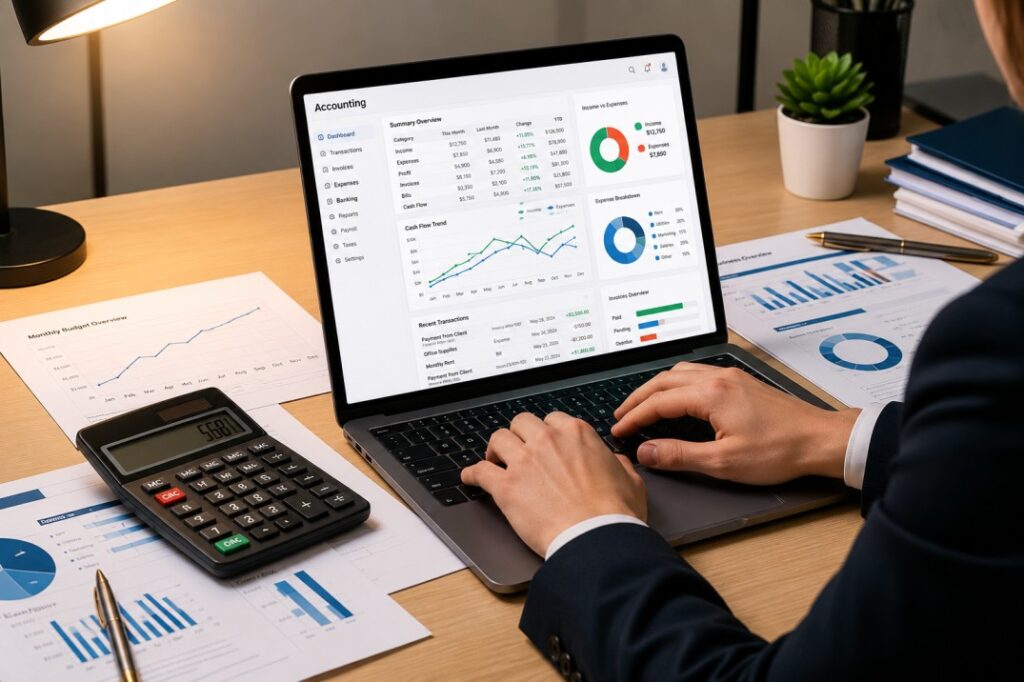
Accounting software is a digital application that helps businesses record financial transactions, manage income and expenses, create invoices, reconcile bank accounts, monitor cash flow, and generate financial reports. It automates routine bookkeeping tasks, reduces manual errors, and provides real-time insights into a company’s financial health.
In This Guide, You’ll Learn
Core Concepts: Learn what accounting software is, how it works, and how it compares to traditional spreadsheets.
Benefits & Features: Explore major financial benefits, essential platform features, and cloud versus desktop deployment options.
Selection & Strategy: Discover how to choose the right accounting software for your needs, avoid common mistakes, and support growth.
Introduction:
Managing business finances becomes increasingly challenging as a company grows. Sales increase, expenses become more frequent, invoices multiply, and keeping track of every financial transaction manually becomes both time-consuming and prone to errors.
Many small businesses begin with spreadsheets or handwritten records because they’re inexpensive and familiar. While this approach may work during the early stages, it often becomes difficult to maintain as financial data grows. Missing invoices, inaccurate calculations, duplicate entries, and delayed financial reporting can quickly affect cash flow and business decisions. This is where accounting software becomes an essential business tool.
Accounting software simplifies financial management by organizing income, expenses, invoices, tax records, and financial reports in one centralized system. Instead of manually calculating totals or searching through multiple spreadsheets, business owners can access accurate financial information in just a few clicks.
Modern accounting software does much more than basic bookkeeping. Many platforms include automated invoicing, expense tracking, bank reconciliation, payroll management, inventory tracking, tax calculations, financial dashboards, and cloud-based collaboration. These features help businesses save time while improving financial accuracy and compliance.
Today’s accounting software is designed for businesses of every size. Freelancers use it to manage invoices and payments, startups monitor cash flow, retailers track inventory and sales, agencies manage client billing, and growing companies rely on detailed financial reporting to support strategic decisions.
Choosing the right accounting software, however, requires more than comparing prices. Every business has different financial workflows, reporting requirements, and growth plans. Selecting software that aligns with your current needs while supporting future expansion can improve efficiency and reduce administrative work for years to come.
In this guide, you’ll learn how accounting software works, the features that matter most, its benefits for different types of businesses, and practical tips to help you choose the right solution with confidence.
What Is Accounting Software?
Accounting software is a digital financial management system that helps businesses record, organize, process, and report financial information accurately.
Rather than relying on manual bookkeeping, businesses use accounting software to automate repetitive financial tasks while keeping all financial records organized in one secure location. A typical accounting platform allows users to:
- Record income and expenses
- Create professional invoices
- Track customer payments
- Monitor business cash flow
- Reconcile bank transactions
- Generate financial reports
- Prepare tax records
- Manage payroll (on supported platforms)
By automating these processes, businesses reduce human error, improve efficiency, and gain a clearer understanding of their financial performance.
Real-World Example
Imagine a small digital marketing agency serving multiple clients. Without accounting software, the owner may:
- Create invoices manually.
- Record payments in spreadsheets.
- Track expenses separately.
- Calculate monthly profits by hand.
- Prepare tax information manually.
As the number of clients grows, this process becomes increasingly difficult and time-consuming. With accounting software, invoices are generated automatically, payments are recorded instantly, expenses are categorized, bank transactions are synchronized, and financial reports are available in real time. Instead of spending hours managing paperwork, the business owner can focus on serving clients and growing the company.
Businesses That Commonly Use Accounting Software
Accounting software benefits organizations across many industries, including:
- Small businesses
- Startups
- Freelancers
- Consultants
- Marketing agencies
- Retail stores
- E-commerce businesses
- Manufacturing companies
- Professional service firms
- Nonprofit organizations
Regardless of industry, the goal remains the same: maintaining accurate financial records while improving efficiency and supporting better business decisions.
How Accounting Software Works
Although different accounting platforms offer unique features, most follow a similar workflow for managing business finances.
Step 1: Record Financial Transactions
Every financial activity including sales, purchases, expenses, and payments is recorded within the software. This creates a complete financial history that can be accessed whenever needed.
Step 2: Categorize Income and Expenses
The software automatically organizes transactions into categories such as:
- Sales revenue
- Operating expenses
- Office supplies
- Marketing costs
- Utilities
- Payroll
- Taxes
Accurate categorization improves financial reporting and simplifies tax preparation.
Step 3: Generate Invoices
Businesses can create professional invoices directly within the software.
Invoices often include:
- Customer details
- Products or services
- Payment terms
- Due dates
- Taxes
- Payment status
Many platforms also send automatic payment reminders, helping businesses receive payments more quickly.
Step 4: Reconcile Bank Transactions
Many accounting platforms connect directly with business bank accounts.
Transactions are imported automatically, allowing businesses to verify that accounting records match bank statements while reducing manual data entry.
Step 5: Generate Financial Reports
One of the biggest advantages of accounting software is real-time reporting. Businesses can instantly generate reports such as:
- Profit and Loss Statement
- Balance Sheet
- Cash Flow Statement
- Expense Reports
- Accounts Receivable Reports
- Tax Reports
These reports help owners understand business performance and make informed financial decisions.
Expert Tip: Accounting software provides the greatest value when financial records are updated consistently. Recording transactions regularly, reconciling bank accounts each month, and reviewing financial reports frequently helps businesses maintain accurate records and avoid costly errors during tax season.
Key Features of Accounting Software
Modern accounting software is much more than a digital ledger. It helps businesses automate financial tasks, improve accuracy, and gain real-time insights into their financial performance. While features vary by platform, the following are considered essential for most businesses.
Invoicing and Billin: Creating professional invoices manually can be time-consuming, especially as your customer base grows. Accounting software allows businesses to generate invoices within minutes by including customer details, products or services, taxes, payment terms, and due dates. Many platforms also let you customize invoice templates to match your brand.
Some solutions even automate recurring invoices and send payment reminders, helping businesses improve cash flow and reduce late payments.
Expense Tracking: Understanding where your money goes is just as important as tracking revenue. Accounting software records and categorizes business expenses automatically, making it easier to monitor spending across different departments or projects. Instead of searching through receipts or spreadsheets, businesses can instantly view expenses related to travel, marketing, payroll, office supplies, utilities, and other operational costs.
Better expense tracking helps identify unnecessary spending and supports more informed budgeting decisions.
Bookkeeping Automation: Manual bookkeeping often leads to duplicate entries, calculation errors, and inconsistent records. Accounting software automates many bookkeeping tasks by recording transactions, categorizing income and expenses, calculating balances, and maintaining an organized financial ledger.
Automation reduces repetitive work while improving the accuracy of financial records.
Bank Reconciliation: Reconciling bank transactions manually can take hours each month. Many accounting platforms connect securely with business bank accounts and automatically import transactions. The software compares these transactions with accounting records, making it easy to identify missing payments, duplicate entries, or discrepancies.
Regular bank reconciliation helps maintain accurate financial records and reduces the risk of costly mistakes.
Financial Reporting: One of the biggest advantages of accounting software is instant access to financial reports. Businesses can generate reports such as:
- Profit and Loss Statements
- Balance Sheets
- Cash Flow Reports
- Expense Reports
- Sales Reports
- Tax Summaries
These reports provide valuable insights into business performance and support better financial planning.
Payroll Management: Many accounting platforms include payroll features or integrate with payroll software. Businesses can calculate employee salaries, deductions, taxes, bonuses, and reimbursements while maintaining accurate payroll records.
Automating payroll reduces administrative work and helps ensure employees are paid correctly and on time.
Inventory Management: For product-based businesses, inventory tracking is essential. Some accounting software allows businesses to:
- Monitor stock levels
- Track product costs
- Record purchases
- Manage suppliers
- Generate inventory reports
This helps prevent overstocking, shortages, and inaccurate inventory valuations.
Tax Management: Preparing taxes becomes much easier when financial records remain organized throughout the year. Accounting software helps businesses:
- Calculate taxes
- Track tax payments
- Generate tax reports
- Organize deductible expenses
- Prepare financial information for accountants
Keeping tax-related information organized reduces stress during tax season.
Multi-User Access: Growing businesses often require multiple employees to access financial information. Many accounting platforms allow businesses to assign different permission levels to accountants, managers, business owners, and finance teams. This improves collaboration while protecting sensitive financial information.
Cloud Access and Data Backup: Cloud-based accounting software automatically saves financial data securely online.
Benefits include:
- Access from anywhere
- Automatic software updates
- Secure backups
- Better collaboration
- Reduced hardware maintenance
For many small businesses, cloud accounting provides greater flexibility than traditional desktop software.
Benefits of Accounting Software
Choosing the right accounting software isn’t simply about replacing spreadsheets. It helps businesses make faster, smarter financial decisions while improving overall efficiency.
Saves Valuable Time
Manual bookkeeping requires entering transactions, updating spreadsheets, calculating totals, and preparing reports. Accounting software automates many of these repetitive tasks, allowing business owners and finance teams to focus on growing the business instead of managing paperwork.
Reduces Human Errors
Mistakes in financial records can affect budgeting, tax reporting, and business planning. Automation minimizes calculation errors, duplicate entries, and inconsistent records while improving financial accuracy.
Improves Cash Flow Management
Cash flow is one of the most important indicators of business health.
Accounting software allows businesses to monitor:
- Incoming payments
- Outstanding invoices
- Upcoming expenses
- Available cash balances
Real-time visibility helps businesses make better financial decisions and avoid cash shortages.
Simplifies Tax Preparation
Organized financial records make tax filing significantly easier. Instead of collecting receipts and reconciling transactions at the last minute, businesses can generate accurate reports whenever needed. This saves time and reduces stress during tax season.
Better Financial Decision-Making
Reliable financial information helps business owners understand what’s working and what needs improvement. With real-time reports and dashboards, businesses can:
- Identify profitable products or services
- Monitor expenses
- Plan future investments
- Forecast cash flow
- Set realistic budgets
Better information leads to better business decisions.
Supports Business Growth
As businesses expand, financial operations become more complex.
Accounting software scales alongside the business by supporting larger transaction volumes, additional users, multiple locations, and more advanced reporting requirements. Rather than replacing software every few years, businesses can continue using the same platform as they grow.
Who Should Use Accounting Software?
Accounting software is valuable for almost every organization that manages income, expenses, or financial reporting. It’s particularly useful for:
- Freelancers managing client invoices
- Small businesses tracking daily finances
- Startups monitoring cash flow
- Marketing agencies billing clients
- Consultants managing multiple projects
- Retail stores tracking sales and inventory
- E-commerce businesses processing online transactions
- Growing companies requiring detailed financial reporting
Even sole proprietors can benefit from improved organization and automated bookkeeping.
Signs Your Business Needs Accounting Software
Many businesses continue using manual bookkeeping long after they’ve outgrown it. You may benefit from accounting software if:
- You’re still managing finances in spreadsheets.
- Invoices are difficult to track.
- Expenses are becoming harder to organize.
- Bank reconciliation takes too much time.
- Cash flow is difficult to monitor.
- Financial reports require manual calculations.
- Tax preparation feels overwhelming.
- Your business is growing rapidly.
If several of these situations apply to your business, investing in accounting software can improve both efficiency and financial accuracy.
Accounting Software vs Spreadsheets
Many new businesses begin with spreadsheets because they’re inexpensive and familiar. However, as transaction volumes increase, spreadsheets become more difficult to manage and maintain.
Our Recommendation: Spreadsheets are suitable for basic record-keeping or very small businesses with minimal financial activity. As your business grows, accounting software provides better accuracy, automation, reporting, and long-term scalability.
Expert Tip: Review your financial reports at least once a month not just during tax season. Regularly monitoring profit, expenses, and cash flow helps you identify trends early, make informed business decisions, and avoid financial surprises.
Cloud vs Desktop Accounting Software
One of the first decisions businesses make when selecting accounting software is whether to choose a cloud-based solution or a traditional desktop application. Both options can manage financial records effectively, but they differ in accessibility, maintenance, and scalability.
Which Option Is Better?
For most small businesses, startups, agencies, and growing companies, cloud accounting software is the better choice. It offers automatic updates, secure backups, remote access, and easier collaboration. Desktop accounting software may still suit businesses with strict offline requirements or organizations that prefer keeping all financial data on local systems.
How to Choose the Right Accounting Software
Not every accounting platform is designed for the same business. The right solution depends on your company’s size, financial processes, and future growth plans.
1. Understand Your Business Needs: Before comparing software, identify the financial tasks you perform most often. Consider questions such as:
- Do you send invoices regularly?
- Do you need payroll management?
- Do you track inventory?
- Will multiple employees access the software?
- Do you require detailed financial reporting?
Knowing your priorities makes choosing the right solution much easier.
2. Choose Software That’s Easy to Use: Complicated software often creates unnecessary frustration. Look for an intuitive interface that allows employees to learn the system quickly without extensive training. Simple software usually leads to better adoption across the business.
3. Check Automation Features: Automation saves time and reduces manual work. Useful automation features include:
- Recurring invoices
- Automatic payment reminders
- Bank transaction imports
- Expense categorization
- Financial report generation
The more repetitive tasks the software can automate, the more productive your team becomes.
4. Consider Integrations: Accounting software works best when it connects with other business applications. Useful integrations include:
- CRM software
- Project management software
- Payment gateways
- Inventory systems
- Payroll software
- Banking platforms
Integrations reduce duplicate data entry while improving workflow efficiency.
5. Evaluate Security: Financial information is among a business’s most valuable assets. Choose software that provides:
- Data encryption
- Secure login
- Multi-factor authentication
- Regular backups
- User permission controls
Strong security protects sensitive financial data while reducing business risk.
6. Think About Future Growth: Your accounting software should support your business as it expands. Look for a platform that can accommodate:
- Additional users
- Higher transaction volumes
- Multiple locations
- Advanced financial reporting
- Business integrations
Choosing scalable software helps avoid expensive migrations later.
Common Mistakes to Avoid
Many businesses invest in accounting software but fail to use it effectively.
Avoid these common mistakes:
- Choosing software with features you’ll never use.
- Ignoring employee training.
- Waiting until tax season to update financial records.
- Failing to reconcile bank accounts regularly.
- Not reviewing financial reports each month.
- Choosing software that doesn’t integrate with existing business tools.
Consistent use and regular financial reviews deliver the greatest long-term value.
Accounting Software Checklist
Invoicing & Expenses: Ensure it offers professional invoicing and automated expense tracking.
Banking & Reports: Look for seamless bank reconciliation and robust financial reporting capabilities.
Taxes & Backup: Check for simplified tax management and secure cloud backup options.
Access & Integrations: Verify that it provides convenient mobile access and integrates smoothly with your existing business tools.
Security & Support: Prioritize platforms with strong data security measures and reliable customer support.
FAQ
Quick Answers to Common Questions
Final Thoughts
Managing business finances manually becomes increasingly difficult as a company grows. Invoices, expenses, payroll, taxes, and financial reporting all require time and accuracy, making manual bookkeeping both inefficient and error-prone.
Accounting software simplifies these responsibilities by automating routine financial tasks while providing real-time visibility into your business’s financial health. From invoicing and expense tracking to financial reporting and tax preparation, the right software helps businesses save time, reduce errors, and make more informed decisions.
When choosing an accounting solution, focus on your actual business requirements rather than selecting the platform with the longest feature list. A system that’s easy to use, scalable, secure, and integrated with your existing workflows will deliver far greater long-term value.
As your business continues to grow, accounting software becomes an important part of a connected business technology ecosystem, working alongside CRM platforms, project management software, and other essential business tools to improve efficiency and support sustainable growth.